If you’re running a QA program in a contact center, you already know the drill. Your team spends hours every week listening to calls, scoring agents, calibrating, and delivering feedback and by the time coaching actually happens, the moment has often passed. The behavior you wanted to correct has already repeated itself hundreds of times.
Here’s the uncomfortable truth: most call centers are spending more time on QA administration than on actual quality improvement.
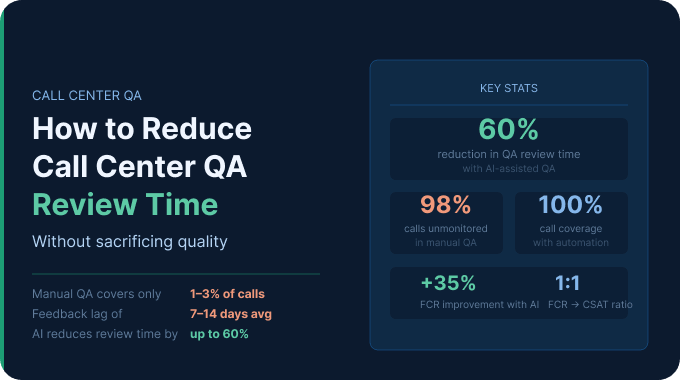
The average QA analyst manually reviews just 1–3% of total call volume, yet spends the majority of their working hours doing it. Scale that across a 50-agent team and you’re looking at thousands of missed coaching moments every single month.
This guide breaks down exactly how to cut QA review time without cutting corners on quality. We’ll cover scorecard design, smart sampling, AI automation, calibration efficiency, and how tools like Enthu.AI make it possible to review every call in a fraction of the time it used to take.
Why Call Center QA Reviews Take So Long And What It’s Costing You?
Before we talk solutions, let’s be honest about the problem. QA slowdowns don’t come from one place they’re usually the result of three compounding inefficiencies stacking on top of each other.
The average QA workload by team size
A QA analyst at a mid-sized contact center typically reviews between 2 and 5 calls per agent, per month. For an agent handling 500+ calls in that same period, that means over 98% of their interactions go completely unmonitored. For a team of 50 agents, that’s tens of thousands of conversations, including potential compliance violations, poor customer experiences, and missed upsell opportunities that no one ever sees.
Even at this limited coverage rate, a QA team of 3–5 analysts can spend 20–30 hours per week just on manual call review. Add calibration sessions, feedback delivery, and report writing, and you’re consuming the majority of your QA bandwidth on process, not outcomes.
Manual review vs. automated review: time benchmarks
Here’s what the numbers look like in practice:
- Manual QA: A single call review (listening, scoring, writing notes) takes 15–25 minutes per call, depending on call length and scorecard complexity.
- Automated QA: AI-powered tools like Enthu.AI can analyze, transcribe, and score a call in seconds — covering 100% of call volume without additional headcount.
- Real-world result: One case study showed an AI call monitoring system halved the QA review time while simultaneously improving agent performance. Another found a consumer brand cut QA review time by 60% after using Enthu.AI to auto-flag high-risk calls.
The math isn’t subtle. For most teams, automation doesn’t just speed things up — it fundamentally changes what’s possible.
The hidden costs: burnout, inconsistency, and delayed feedback
Manual QA has three costs that rarely appear in any budget line:
- Reviewer fatigue. When analysts spend hours listening to calls back-to-back, scoring consistency degrades. One study found that different analysts often interpret subjective criteria like “empathy” or “active listening” very differently — and even the same analyst can score similar calls differently depending on where in the shift they are.
- Calibration drift. Without automated scoring as a baseline, calibration sessions become lengthy debates rather than productive alignment exercises. Teams spend 1–2 hours per calibration session trying to reconcile scoring discrepancies that stem from subjectivity, not actual performance differences.
- Delayed feedback loops. Manual QA typically produces feedback days or weeks after an interaction. By then, an agent has already repeated the same behavior hundreds of times — and the coaching window has effectively closed.
Why 5–10% sampling is no longer enough
Industry data confirms what most QA leaders already suspect: traditional call sampling at 1–5% leaves massive blind spots. You’re not catching compliance violations early. You’re not seeing patterns in customer frustration. And when an agent does get flagged, they often (rightly) question whether the reviewed calls were representative.
74% of organizations track customer critical error accuracy as their top QA metric (COPC). But you can’t accurately track critical errors if you’re only seeing 2% of calls.
Audit Your Current QA Process Before You Optimize It
Most QA efficiency projects fail not because the solutions are wrong, but because teams try to optimize a process they haven’t fully mapped. Before you cut anything, you need to know where the time is actually going.
Mapping your QA workflow end-to-end
Walk through every step your QA team takes from call selection to coaching delivery:
- How are calls selected for review? (Random? Filter-based? Manager-assigned?)
- How long does a typical review take, including note-writing?
- How are scores entered manual form, a spreadsheet, or QA platform?
- How often are calibration sessions held, and how long do they run?
- How is feedback delivered email, 1:1, LMS, or a real-time platform?
- How do you track whether feedback changed agent behavior?
For most teams, steps 1 through 3 consume 70–80% of QA time. Steps 4 through 6 are where quality improvement actually happens and they’re chronically underfunded.
Key QA efficiency metrics to track
If you can’t measure it, you can’t improve it. Start tracking these:
- Time-per-review: Average minutes to complete one evaluation, including notes
- Reviews-per-analyst-per-week: Volume output per person
- Feedback lag: Days between call date and coaching delivery
- Calibration score variance: Standard deviation in scores across analysts for the same call
- Coverage rate: Percentage of total calls reviewed
Most teams discovering these numbers for the first time are often surprised, and unpleasantly. Average feedback lag in manual QA programs regularly exceeds 7–14 days.
Identifying your biggest time drain
Common audit findings:
- Scorecard bloat: A 30-question scorecard takes 3x longer than a 10-question one and rarely produces better coaching outcomes.
- Manual call retrieval: Teams spend 5–10 minutes per review just finding and loading the right recording.
- Disconnected tools: QA scorecards in one system, call recordings in another, CRM data in a third — requiring tab-switching throughout every review.
- Over-calibration: Teams calibrating weekly when monthly would suffice, given the volume.
Streamline Your QA Scorecard and Evaluation Framework
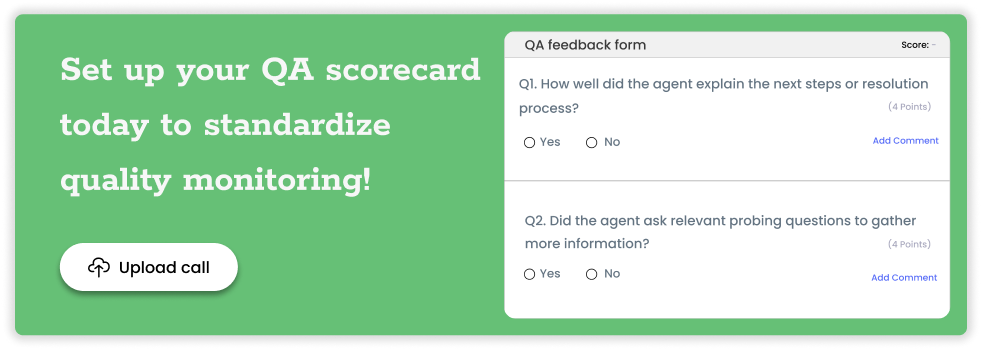
The single fastest way to reduce QA review time before you touch any technology is to fix your scorecard. Most scorecards in the wild are too long, too ambiguous, and too process-focused to produce useful coaching data.
How many questions should a QA scorecard have?
Industry best practice points to 8–15 criteria for most contact center use cases. Beyond that, you’re adding review time without adding insight. Poorly designed scorecards with too many metrics, unclear scoring criteria, or weights that don’t reflect real business priorities are one of the most common causes of QA inefficiency.
The rule of thumb: if a criterion doesn’t directly map to a coaching action or a business outcome (CSAT, FCR, compliance), it probably doesn’t belong on your scorecard.
Fatal flaw vs. behavior-based scoring: choosing the right model
Fatal flaw scoring marks a call as automatically failing if one critical criterion is missed a missing compliance disclosure, a prohibited phrase, an unresolved complaint. This model speeds up reviews significantly because analysts can stop once a fatal flaw is found, and it ensures compliance coverage.
Behavior-based scoring evaluates a broader set of soft skills empathy, problem-solving, and communication clarity. This model produces richer coaching data but takes longer per review.
For most teams, a hybrid model works best: 3–5 fatal flaw criteria that auto-fail a call, plus 6–10 behavior-based criteria for coaching. This ensures compliance without turning every review into a multi-dimensional audit.
Scorecard design best practices for fast, consistent scoring
- Use binary (yes/no) criteria wherever possible they’re faster to score and eliminate inter-rater disagreements
- Avoid criteria that require a full replay of the call to score you should be able to answer each question in real time as you listen
- Add behavioral anchors: specific examples of what a “1,” “3,” and “5” look like on a numeric scale
- Limit open-text fields to one per review; they’re time-consuming and rarely read
How to run a scorecard audit and reduce criteria by 30%
Run a 90-day correlation analysis: which scorecard criteria have the strongest correlation with CSAT scores and FCR outcomes? Which criteria show near-zero variance across agents (everyone scores 5 every time)? Criteria with no coaching utility and no performance correlation are candidates for removal. Most teams find they can eliminate 3–6 criteria without losing any meaningful quality signal.
Use Automation and AI to Cut QA Review Time in Half
This is where the leverage is. Manual QA will always be bottlenecked by human attention spans and working hours. AI-powered QA removes that ceiling entirely.
What is automated QA in call centers, and how does it work?
Automated QA uses speech recognition to convert call audio into transcripts, then applies AI models to evaluate each conversation against your defined QA criteria. Scores are assigned automatically for each criterion, and calls are ranked, flagged, or summarized based on configurable rules.
The output: a scored evaluation for every call, in seconds, without a human listening to a single recording unless the AI has flagged it for review.
Enthu.AI takes this further by combining auto-scoring with conversation intelligence: surfacing not just whether a criterion was met, but why, with timestamped moments in the transcript where behaviors occurred. QA analysts can jump directly to the relevant 30-second clip instead of listening to a 7-minute call.
Auto-scoring 100% of calls: benefits, risks, and accuracy benchmarks
Benefits:
- Full call coverage eliminates sampling bias
- AI evaluates every single interaction, ensuring no critical compliance event goes undetected
- Consistent scoring regardless of analyst fatigue or shift timing
- Real-time and near-real-time insights reducing feedback delays from weeks to hours
What to watch for:
- AI accuracy varies by vendor and use case test against human-scored calls before full deployment
- Complex subjective criteria (nuanced empathy, advanced de-escalation) may still require human review
- The goal is AI handling the screening layer, with humans focused on coaching and edge cases
Accuracy benchmark: Tools like SQM’s mySQM use proprietary AI to predict QA scores and customer satisfaction with up to 95% accuracy for every call.
AI-assisted QA: using AI to flag calls for human review, not replace it
The most practical implementation for most teams isn’t full AI scoring it’s AI as a triage layer. The AI analyzes 100% of calls and surfaces the 10–20% that need human attention: calls with compliance gaps, negative sentiment, escalation language, long silence periods, or unusual handle times.
Enthu.AI’s auto-flagging logic means QA teams focus only on calls with compliance gaps, escalations, or negative sentiment, saving hours and speeding up coaching. Instead of randomly selecting calls and hoping they’re representative, you’re reviewing the calls that actually matter.
How to calculate ROI before investing in QA automation
A simple framework:
- Current QA cost: (Number of analysts × hourly fully-loaded cost) × QA hours per week × 52
- Time savings estimate: If automation reduces manual review by 60–70%, multiply by 0.6–0.7 to get hours freed
- Reallocated value: What’s the value of those hours redirected to coaching, calibration, and process improvement?
- Quality uplift value: Companies using AI assistance have seen first-call resolution rates improve 35% and handle times cut by 40% what’s a 1% FCR improvement worth to your business? (SQM research shows each 1% improvement in FCR delivers a 1% increase in CSAT.)
Top QA automation features to look for
When evaluating QA automation tools, prioritize:
- Auto-transcription and timestamping — jump to specific moments without full playback
- Custom scoring triggers — define which keywords, phrases, or silence patterns flag a call
- Sentiment analysis — surface calls with frustrated customers or tense agent behavior
- CRM and dialer integration — eliminate manual call retrieval
- Agent self-coaching portals — let agents review their own flagged calls before the coaching session
- Calibration support — tools that let multiple analysts score the same AI-flagged call and compare results
Smarter Call Sampling Strategies That Save Hours Each Week
Even with AI in the mix, smart sampling logic determines where your team’s attention goes. Here’s how to stop reviewing randomly and start reviewing strategically.
Why random sampling misses the calls that matter most
Random sampling has one purpose: statistical representativeness. But in QA, you’re not running an academic study you’re trying to catch problems and coach improvement. A random sample of 5 calls per agent is just as likely to surface 5 perfectly normal calls as it is to surface the one call where the agent misrepresented a product feature.
Traditional QA samples only a tiny fraction of calls, creating blind spots in compliance, coaching, and CX risks. Smart sampling replaces randomness with intentionality.
Risk-based sampling: prioritizing calls by agent, handle time, or sentiment
Risk-based sampling logic assigns review priority based on signals that predict call quality problems:
- New or recently trained agents: Higher review frequency during the first 60–90 days
- Handle time outliers: Calls significantly longer or shorter than average often signal problems
- Negative sentiment triggers: AI-flagged calls where the customer tone shifted negative
- Disposition codes: Calls ending in escalation, transfer, or repeat contact
- Performance trend dips: Agents whose QA scores dropped 10%+ week-over-week
This approach ensures that limited QA bandwidth is allocated where it has the highest coaching ROI.
Event-triggered review: using escalations, transfers, and low CSAT scores as signals
Rather than sampling on a schedule, set up automated triggers:
- Any call that ended in a supervisor transfer → automatic review queue
- Any post-call survey with CSAT below 3 → flag for immediate review
- Any call with more than 90 seconds of silence → flag for potential agent knowledge gap
- Any call using prohibited language or missing required disclosures → compliance review queue
Enthu.AI automatically tags all calls that mention refunds, cancellations, or customer dissatisfaction; these surface themselves without any analyst having to listen.
Calculating your optimal review rate per agent per week
There’s no universal right answer, but here’s a practical framework:
- New agents (0–90 days): 5–8 calls per week
- Developing agents (active performance issues): 5–6 calls per week
- Stable agents (consistent scores): 2–3 calls per week, plus event-triggered reviews
- High performers: 1–2 calls per week for calibration and recognition
With AI handling 100% screening and surfacing the calls that need human attention, these numbers become the ceiling, not the floor. Your analysts spend their time on the calls that already matter, not a random draw.
Reduce Time Spent on Calibration and Feedback Delivery
QA review time doesn’t end when the scorecard is submitted. Calibration and coaching delivery are where QA teams hemorrhage hours, and where most efficiency guides stop. Let’s fix that.
How to run a 30-minute calibration session that actually works
Traditional calibration runs long because it tries to resolve every disagreement in real time. A more efficient model:
Before the session (15 min async):
- Distribute 1–2 AI-scored calls to all participants
- Each analyst scores independently using the standard scorecard
- Analysts note any criteria they’re uncertain about
During the session (30 min):
- Review only the criteria where scores diverged by 2+ points
- Anchor the discussion to behavioral examples in the transcript, not general impressions
- Agree on a single standard and document it in a shared “scoring decisions” log
After the session (10 min):
- Update scorecard guidance notes based on calibration decisions
- Share the log with any analysts who couldn’t attend
This model cuts calibration time by 40–50% while producing better scoring consistency than open-ended discussion.
Async feedback vs. live coaching: when to use each
Async feedback (written comments, timestamped audio clips, in-platform notes) works well for:
- Routine feedback on stable performers
- Positive reinforcement, what they did well and why
- Minor adjustments to specific call moments
Live coaching is worth scheduling for:
- Pattern-level issues recurring across multiple calls
- Fatal flaw violations requiring immediate behavior change
- New agents in their first 90 days
- Agents with declining trend lines who need structured support
Using async delivery for 60–70% of routine feedback frees up coaching time for the conversations that genuinely require live discussion.
Using feedback templates to cut delivery time by 50%
Structured feedback templates turn a 20-minute feedback-writing session into a 5-minute fill-in exercise. A good template includes:
- Call summary: What the call was about (one sentence)
- What worked: Specific moment + why it was effective
- What to improve: Specific moment + behavioral alternative
- Action item: One thing to practice on the next 5 calls
- Resource link: Relevant training clip or knowledge article
Pre-built templates for your 5–10 most common call types (billing dispute, cancellation attempt, complex technical issue) save hours across a full QA team every week.
How to track whether feedback is actually changing agent behavior
Feedback that doesn’t change behavior isn’t QA — it’s administrative theater. To close the loop:
- Track the specific criterion cited in feedback for the 4 weeks following coaching delivery
- Use week-over-week trend data, not single-call scores, to measure improvement
- Build a “feedback impact score” into your QA dashboard: what percentage of coaching interventions resulted in measurable score improvement within 30 days?
AI-enabled QA platforms like Enthu.AI make this possible because they analyze 100% of post-coaching calls automatically, and you see whether behavior actually changed, not just whether the agent said “got it” in the coaching session.
Build a Scalable QA Workflow: People, Process, and Technology
Efficiency tactics compound when they’re embedded in a scalable system. Here’s how to build one.
Right-sizing your QA team: analyst-to-agent ratios
Common benchmarks by contact center size:
| Team size | Manual QA ratio | With AI-assisted QA |
| <50 agents | 1 analyst: 10–15 agents | 1 analyst: 30–50 agents |
| 50–200 agents | 1 analyst: 12–20 agents | 1 analyst: 40–75 agents |
| 200+ agents | 1 analyst: 15–25 agents | 1 analyst: 60–100 agents |
These are directional benchmarks; actual ratios depend on the regulatory environment, call complexity, and coaching model. The key insight: AI doesn’t replace QA analysts, it multiplies their capacity. The same team can cover significantly more agents with higher review accuracy when AI handles the screening layer.
Building a QA tech stack: from scorecards to end-to-end platforms
A modern QA stack typically includes:
- Call recording and storage — your dialer or CCaaS platform (Five9, RingCentral, Genesys, etc.)
- Auto-transcription — converts audio to searchable text (built into platforms like Enthu.AI)
- AI scoring and flagging — analyzes 100% of calls, surfaces review priorities
- QA scorecard and evaluation tool — where analysts complete reviews and add coaching notes
- Coaching delivery platform — where feedback reaches agents (in-app, email, or integrated LMS)
- Performance dashboards — where trends are tracked at agent, team, and program level
Enthu.AI consolidates steps 2 through 6 in a single platform — eliminating the tool-switching that quietly eats 20–30% of QA analysts’ time. It automatically evaluates and transcribes all calls, reducing time spent by managers manually reviewing calls, and generates accurate call summaries to cut down wrap-up time.
Change management: getting buy-in from agents and team leaders
The most common reason QA efficiency projects stall isn’t technology — it’s culture. Agents who’ve experienced QA as a policing function are skeptical. Team leaders who’ve built their own review processes feel protective of them.
A few principles that help:
- Lead with the agent benefit: Faster feedback, more specific coaching, objective scoring. AI means their score isn’t dependent on which analyst happened to review their call.
- Involve team leads in scorecard design: They know what behaviors actually matter on their calls.
- Share the data transparently: Publish team-level QA trends, not just individual scores. Agents want to know how they compare to the norm.
- Celebrate improvement stories: Find agents whose scores improved after coaching and make those wins visible.
QA maturity model: where does your program stand?
Level 1 — Reactive auditing: Random sampling, manual scoring, feedback delivered when time allows. Coverage < 5%.
Level 2 — Structured monitoring: Defined scorecard, regular calibration, scheduled feedback cadence. Coverage 5–15%.
Level 3 — Targeted intelligence: Risk-based sampling, consistent calibration, feedback templates. Coverage 15–30%.
Level 4 — AI-assisted QA: Automated screening of 100% of calls, AI-prioritized review queues, structured coaching workflows. Coverage 30–80% of high-risk calls + 100% compliance monitoring.
Level 5 — Proactive quality intelligence: Real-time alerts, predictive performance monitoring, agent self-coaching, coaching impact tracking. Coverage 100% with AI, 10–20% with human depth review.
Most teams reading this are at Level 1 or 2. The good news: moving from Level 2 to Level 4 doesn’t require a complete technology overhaul, it typically requires a QA platform like Enthu.AI, a scorecard redesign, and a sampling strategy refresh.
12-month roadmap for transforming your QA review process
Months 1–2: Audit and baseline
- Map current workflow, measure time-per-review, feedback lag, and coverage rate
- Run scorecard audit; eliminate low-utility criteria
- Establish the current analyst-to-agent ratio and weekly review volume
Months 3–4: Scorecard and sampling redesign
- Launch revised scorecard (target: 10–12 criteria max)
- Implement risk-based sampling logic using existing dialer data
- Move calibration to async pre-work + 30-minute live session model
Months 5–6: AI automation pilot
- Deploy AI auto-transcription and scoring on a single team or call type
- Compare AI scores to human scores; calibrate where needed
- Measure time-per-review before and after
Months 7–9: Scale and integrate
- Expand AI coverage to the full team
- Connect the QA platform to CRM and coaching delivery workflow
- Launch agent self-coaching portal
Months 10–12: Optimize and measure impact
- Track coaching impact scores: Is behavior changing after feedback?
- Refine sampling triggers based on 6 months of AI data
- Report on QA program ROI: time saved, FCR change, CSAT trend
The Bottom Line
Reducing call center QA review time isn’t about doing less, it’s about doing the right things faster and at scale.
The QA teams making the biggest gains right now are doing three things differently from teams that are stuck:
- They’ve fixed their scorecards. Leaner criteria, clearer anchors, faster scoring.
- They’ve adopted AI as a screening layer. Not to replace human judgment, but to direct it to surface the calls that deserve attention from the ones that don’t.
- They’ve rebuilt their feedback loop. Templates, async delivery for routine feedback, live coaching reserved for what matters.
Traditional QA sampling only reviews 1–3% of calls, yet consumes the majority of QA bandwidth. AI-powered QA covers 100% of calls and reduces analyst time by 60%+, not by removing the human from the loop, but by putting the human exactly where they add the most value.
If your team is still spending 20+ hours a week on manual call review, the inefficiency isn’t a staffing problem. It’s a systems problem. And it’s very fixable.

 On this page